
One task. One screen.
Every second deserves clarity.
Designed for moments, not minutes.
Information at the right moment.
The interface is only half the experience.
Designed to help without interrupting.
Confidence mattered more than speed.
Small changes. Big difference.
Language should never be a barrier.
Adapt to people, not the other way around.
Real impact requires collaboration.
Still only the beginning.
For the people who taught me patience.
Made with Figma, empathy &
many iterations.
Everything started with one observation
The problem was personal.
Patterns started emerging.
Technology shouldn't increase anxiety.
Every interview changed the direction.
Real stories > Imagined problems
Designed for people, not demographics.
Every persona represents someone real.
Removing friction is harder than adding
features.
Comfort over complexity.
Every version answered a new question.
Started with language, not login.
Accessibility begins before the first tap.
Sehat Saathi
Healthcare | Accessibility | Voice UX
PLATFORM : Mobile | WearOS
DURATION : 3 Weeks
Technology should adapt to people… not the other way around.
Helping elderly users to navigate digital healthcare independently through voice-first, multilingual design.
Over the last decade, I lost all four of my grandparents. They lived long, independent lives but near the end, I watched them slowly lose confidence in a world they could no longer navigate.
They couldn't book a check-up, read an OTP, or tap the right part of the screen. Despite how sharp they were, they were excluded by default not because they didn't want to learn, but because technology never tried to learn them.
This project is a tribute and a tool. It doesn't try to modernise elderly users. It adapts to them.
These conversations came from informal interviews, usability sessions, and years of personal observation. Although every participant had different needs, the same frustration appeared again and again. The issue was not ability, it was how digital healthcare expected everyone to think, read, and interact in exactly the same way.
These personas are synthesised from recurring patterns observed during interviews, usability sessions, and live observations.
Every design decision started with one question:
These reflections became the design principles that guided every screen of Sehat Saathi.
The direction was shaped by one belief : technology should adapt to elderly users, not the other way around.
002 UNDERSTANDING THE PROBLEM
003 DESIGN DIRECTION
004 PEOPLE I DESIGNED FOR
005 HOW THE DESIGN EVOLVED
006 THE PROTOTYPE
007 SYSTEM INTELLIGENCE
008 USABILITY OUTCOMES
009 DESIGNED FOR EVERY ABILITY
010 FUTURE SCOPE
011 REFLECTION
012 LICENSE
013 LINKS
CHECK OUT OTHER PROJECTS
The experience begins in the user's language, not mine. Every option is visible immediately, removing the need to scroll or search before getting started.
The experience adapts based on who is involved. Caregivers receive gentle notifications while preserving the independence of the elderly user.
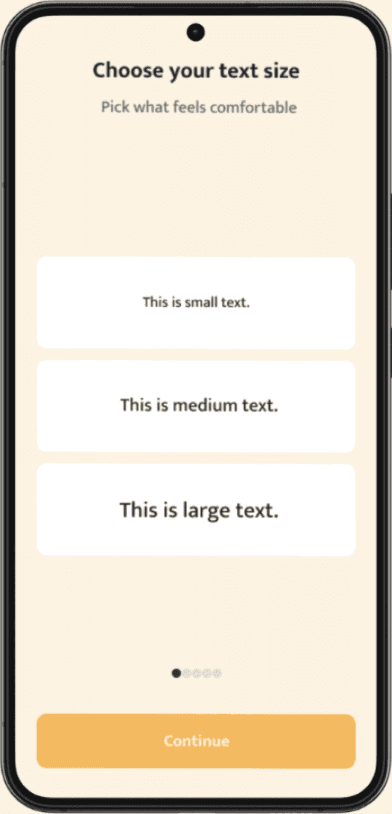
Accessibility isn't hidden inside settings, Users personalise readability, voice and comfort before their first interaction, with every change confirmed through speech.
The dashboard surfaces only today's priorities. Every essential action remains one tap or one sentence away, while emergency support is always within reach.
Upcoming appointments are prioritised over medical history, reducing cognitive load while keeping rescheduling effortless.
During emergencies, clarity matters more than choice. Oversized actions, voice support and haptic feedback reduce hesitation when every second counts.
Accessibility preferences remain editable at any time without overwhelming the user, allowing the interface to evolve alongside changing needs.
Watch respects phone mode (Standard / Calm / High contrast)
Good healthcare isn't just about what users see. It's also about how the system quietly supports them.
Hindi and English prototypes were tested and both supported low-anxiety interactions throughout the experience.
Every user experiences healthcare differently. Sehat Saathi adapts instead of expecting people to adapt.
Requires collaboration beyond the prototype
This wasn't about building an app.
It quietly says: "You matter, even if your fingers tremble."
Accessibility wasn't offered as an optional feature, it was integrated into the experience from the first interaction.
Hospital Integration APIs
Smart Speaker Companion
Script Level Validation
NGO & Rural Healthcare Pilots
Longitudinal Impact Study
Open Accessibility Design System
Sehat Saathi establishes a strong foundation for accessible digital healthcare. The next phase focuses on validating the concept through real-world deployment and cross-sector collaboration.
It was about building something my grandparents could use without asking for help.
Sehat Saathi doesn't rush. It reassures.
© 2025 Kriti Suri. All rights reserved.
No part of this case study may be reproduced, distributed, or reused without explicit permission.
Icons via Google Material Symbols. Typeface: Mukta (Google Fonts).
Built for academic and portfolio purposes.
This design may be expanded into a real product in the future.
Connect appointments, prescriptions, laboratory reports, and Electronic Health Records.
Extend voice interactions to devices like Google Home and Amazon Alexa for hands-free assistance.
Test all eight supported Indian languages with native speakers to improve readability, pronunciation, and cultural familiarity.
Evaluate adoption in underserved communities through partnerships with NGOs and primary healthcare centres.
Measure changes in medication adherence, stress levels, caregiver confidence, and user independence over time.
Release reusable accessibility components and guidelines for public health teams and healthcare designer.
UI + Voice available in:
Adaptive Display modes:
Notice script shown first | Familiar phrasing | Dialect-neutral voice prompts
English
Each tracker focuses on one decision at a time. Instead of navigating dashboards, users simply complete the next meaningful action.
Welcome + Language Selection
Role Selection
Personal Setup
Home Dashboard
Doctor Appointments
Emergency Page
Settings
Tracker Detail Pages
The assumption gap
Everything I learned became this…
It didn't stop at the phone…
Success wasn't measured in taps.
It was measured in confidence.



001 WHY I BUILT THIS




Every decision was guided by empathy, simplicity and respect.


Smart Accessibility Plugin
A figma plugin that surfaces accessibility gaps and integrates inclusive design into everyday workflows.
Accessibility | Figma Plugin | Design Systems
ReDrop
An anonymous support system for accessing sanitary products in moments of urgency.
Anonymous Support | Menstrual Care | Mutual Aid
