
Exploring before committing.
One screen, one decision at a time.
Designed around real routines.
Real users. Real feedback.
Small issues surfaced quickly.
Small changes, meaningful impact.
Let’s see what can change.
The small things add up.
Something felt off.
Listen before designing.
Now the picture is clearer.
One problem, many moments.
People rarely follow the happy path.
Every frustration is a clue.
Turn friction into opportunity.
Less effort, more clarity.
Keep what works.
Clarity became the priority.
Great ideas start messy.
Too much friction, too little clarity.
Time to look closer.
The details matter.
What are users really doing?
The friction had a pattern.
This is where we begin.
Context changes everything.
Design around real behaviour.
What if this felt simpler?
A better flow starts here.
Fix what gets in the way.
Now, let’s make it real.
Try it. Break it. Try again.
Clarity begins with experimentation.
Less friction, more flow.
Everything important, nothing overwhelming.
Testing turns assumptions into evidence.
Back to the drawing board.
Still learning. Still refining.
Good design keeps evolving.
A familiar place to start.

Domino's India Mobile App Redesign
Clarity | Speed | Convenience
PLATFORM : Mobile | WearOS
DURATION : 3 Months
Ordering pizza should feel as easy as eating it…
Reimagining the Domino's India ordering experience to reduce friction, simplify navigation, and make every step from craving to checkout fell effortless.
001 A SLICE OF FRUSTRATION

With 80 real users sharing their experiences, one thing was clear:
The core issues weren't about reinventing the wheel, but about refining it. My goals for this project were:
What 80 users told me about the Domino's app
The Domino's UX crime scene: 4 major offenders
Armed with real user insights, I conducted a deep dive UX audit of the Domino's India app, analysing its usability, navigation, visual design, and overall experience. Here's what I found:
The Domino's app issues aren't isolated screens.
They're connected friction points across the entire ordering journey.
Five steps. One messy ordering experience.
I started by looking beyond what the app was doing wrong and focused on why the experience felt frustrating in the first place.
Research, audits and user journeys helped turn scattered complaints into clear design opportunities.
To truly understand user frustrations, I conducted a survey with 80 Domino's app users from different backgrounds: students, working professionals, self employed users and homemakers.
002 PROJECT GOALS
The Domino's app isn't broken… it's just not living up to its full potential.
003 THE INVESTIGATION
004 CRACKING THE CODE
005 DISSECTING THE EXPERIENCE
006 PEOPLE BEHIND THE PROBLEM
007 FROM INSIGHT TO DIRECTION
008 EXPLORING THE SOLUTION
009 THE REDESIGN
010 USABILITY TESTING
011 WHAT I LEARNED
012 LINKS
To design the right solution, I stepped into the shoes of real users and understood their goals, frustrations and needs.
Turning findings into design priorities.
The patterns were clear. The challenge now was deciding what to fix first and what would make the biggest difference to the ordering experience.
With a clear direction, I began ideating possible solutions. I explored multiple approaches, sketched freely, and translated the strongest ideas into low-fidelity wireframes.
Three perspectives. One ordering journey.
You just wanted to order pizza.

Imagine this: It's Saturday night, and you're craving a cheesy, piping-hot pizza. You open the Domino's app, excited to place your order.
But instead of a smooth, delightful experience, you're stuck on a long loading screen, struggling to find your favourite pizza, and wondering why your discount coupon isn't working.
Sounds familiar? You're not alone.
The Domino's India app has millions of users, but the experience often falls short of expectations. Slow loading times, confusing navigation, outdated visuals, and a checkout flow that feels more like a chore than a convenience. This case study is my attempt to turn that frustration into a more delightful, efficient, and intuitive pizza ordering experience.






A lighter first impression.
Replaced the static loading experience with a cleaner, more purposeful entry.
Choose before you browse.
Delivery, takeaway, and dine-in are surfaced upfront instead of buried later.
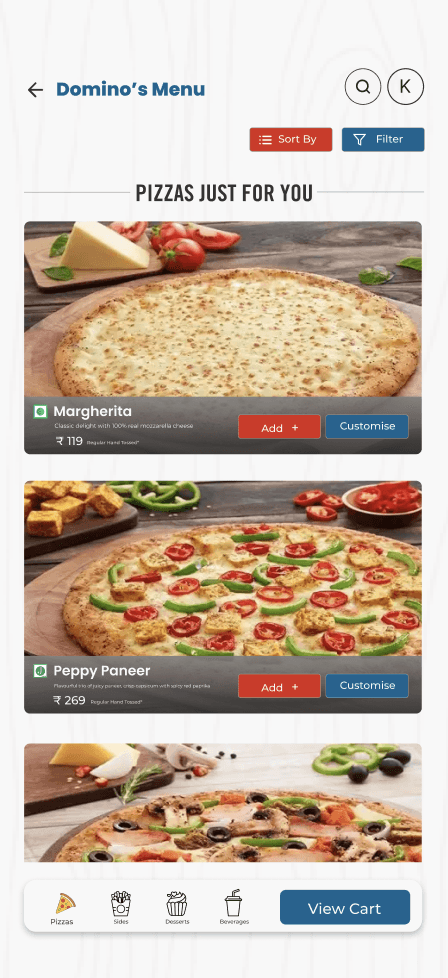
Less scrolling, smarter discovery
Grouped categories and clearer product cards help users scan at a glance.
Everything in one clear view
Simplified the cart so items, quantities, offers and total are easy to understand.
Turn waiting into visibility.
Clear status updates keep users informed throughout delivery.
Clear confirmation, no uncertainty
Immediately tells users what happened and what comes next.
Instant confirmation
A clear success state removes doubt immediately after ordering.
Know when to switch back.
The watch handles quick updates, while richer details stay on the phone.
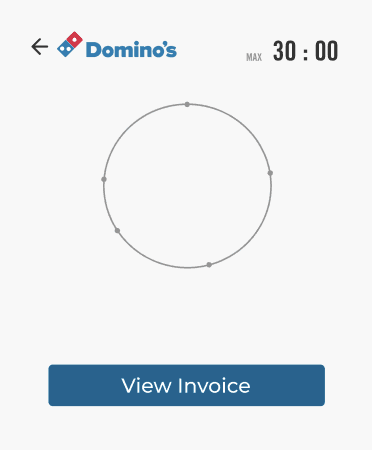
Progress at a glance.
A focused countdown keeps the most important information visible without opening the phone.
Start with what you crave.
Clear categories and visual discovery make popular choices easier to find.
Sign in without the friction.
Simplified login with faster access and familiar sign-in options.
Built for group orders.
Added a simpler way to divide the bill without leaving the checkout.
Filters that actually help
Added practical controls for dietary preferences, price and popularity.
Customise without the confusion
Topping, size, and crust choices are organised into a clearer decision flow.


Small changes, meaningful impact.
This project taught me that good design comes from listening, testing, and refining.
The biggest takeaway was to design around how people actually use a product, not how we assume they will.
Listen. Test. Refine.


CHECK OUT OTHER PROJECTS

ReDrop
An anonymous support system for accessing sanitary products in moments of urgency.
Anonymous Support | Menstrual Care | Mutual Aid
Sehat Saathi
Designing accessible and dignified telehealth onboarding for elderly users navigating digital healthcare systems.
Healthcare | Accessibility | Voice UX
Smart Accessibility Plugin
A figma plugin that surfaces accessibility gaps and integrates inclusive design into everyday workflows.
Accessibility | Figma Plugin | Design Systems
Domino's India Mobile App Redesign
Clarity | Speed | Convenience
PLATFORM : Mobile | WearOS
DURATION : 3 Months
Ordering pizza should feel as easy as eating it…
Reimagining the Domino's India ordering experience to reduce friction, simplify navigation, and make every step from craving to checkout fell effortless.
001 A SLICE OF FRUSTRATION
You just wanted to order pizza.
Imagine this: It's Saturday night, and you're craving a cheesy, piping-hot pizza. You open the Domino's app, excited to place your order.
But instead of a smooth, delightful experience, you're stuck on a long loading screen, struggling to find your favourite pizza, and wondering why your discount coupon isn't working.
Sounds familiar? You're not alone.
The Domino's India app has millions of users, but the experience often falls short of expectations. Slow loading times, confusing navigation, outdated visuals, and a checkout flow that feels more like a chore than a convenience. This case study is my attempt to turn that frustration into a more delightful, efficient, and intuitive pizza ordering experience.
002 PROJECT GOALS
With 80 real users sharing their experiences, one thing was clear:
The Domino's app isn't broken… it's just not living up to its full potential.
The core issues weren't about reinventing the wheel, but about refining it. My goals for this project were:
003 THE INVESTIGATION
Five steps. One messy ordering experience.
I started by looking beyond what the app was doing wrong and focused on why the experience felt frustrating in the first place.
Research, audits and user journeys helped turn scattered complaints into clear design opportunities.
004 CRACKING THE CODE
What 80 users told me about the Domino's app
To truly understand user frustrations, I conducted a survey with 80 Domino's app users from different backgrounds: students, working professionals, self employed users and homemakers.
The Domino's UX crime scene: 4 major offenders
005 DISSECTING THE EXPERIENCE
Armed with real user insights, I conducted a deep dive UX audit of the Domino's India app, analysing its usability, navigation, visual design, and overall experience. Here's what I found:
The Domino's app issues aren't isolated screens.
They're connected friction points across the entire ordering journey.
006 PEOPLE BEHIND THE PROBLEM
Three perspectives. One ordering journey.
To design the right solution, I stepped into the shoes of real users and understood their goals, frustrations and needs.
007 FROM INSIGHT TO DIRECTION
Turning findings into design priorities.
The patterns were clear. The challenge now was deciding what to fix first and what would make the biggest difference to the ordering experience.
008 EXPLORING THE SOLUTION
With a clear direction, I began ideating possible solutions. I explored multiple approaches, sketched freely, and translated the strongest ideas into low-fidelity wireframes.
009 THE REDESIGN
From friction to flow.
Know when to switch back.
The watch handles quick updates, while richer details stay on the phone.
Progress at a glance.
A focused countdown keeps the most important information visible without opening the phone.
A lighter first impression.
Replaced the static loading experience with a cleaner, more purposeful entry.
Less scrolling, smarter discovery
Grouped categories and clearer product cards help users scan at a glance.
Start with what you crave.
Clear categories and visual discovery make popular choices easier to find.
Choose before you browse.
Delivery, takeaway, and dine-in are surfaced upfront instead of buried later.
Sign in without the friction.
Simplified login with faster access and familiar sign-in options.
Built for group orders.
Added a simpler way to divide the bill without leaving the checkout.
Customise without the confusion
Topping, size, and crust choices are organised into a clearer decision flow.
Everything in one clear view
Simplified the cart so items, quantities, offers and total are easy to understand.
Instant confirmation
A clear success state removes doubt immediately after ordering.
Clear confirmation, no uncertainty
Immediately tells users what happened and what comes next.
Turn waiting into visibility.
Clear status updates keep users informed throughout delivery.
Filters that actually help
Added practical controls for dietary preferences, price and popularity.
010 USABILITY TESTING
011 WHAT I LEARNED
Small changes, meaningful impact.
This project taught me that good design comes from listening, testing, and refining.
The biggest takeaway was to design around how people actually use a product, not how we assume they will.
Listen. Test. Refine.
012 LINKS
A familiar place to start.
Too much friction, too little clarity.
Time to look closer.
The details matter.
What are users really doing?
The friction had a pattern.
This is where we begin.
Context changes everything.
Design around real behaviour.
What if this felt simpler?
A better flow starts here.
Fix what gets in the way.
Now, let’s make it real.
Try it. Break it. Try again.
Clarity begins with
experimentation.
Less friction, more flow.
Everything important, nothing
overwhelming.
Testing turns assumptions
into evidence.
Back to the drawing board.
Still learning. Still refining.
Good design keeps evolving.
From friction to flow.
